
Child support payment tracker: free printable template and spreadsheet
Updated November 6, 2026 · 4-minute read
Short answer: write one line for each payment on the day it's paid or received: the date it was due, the amount due, the date and amount paid, who paid, how it was paid, and the confirmation number or receipt. If support goes through your state, compare your log with the state's payment history once a month.
Whether you pay child support or receive it, a simple tracker helps you see right away if a payment was late, short or missing, and keeps the details together if a question comes up later. Below: what to write down, a filled-in example, a free printable log and a free spreadsheet template.
What to write down for each payment
- Date due and amount due, as your order or agreement says
- Date paid and amount paid, even when it's only part of the amount
- Who paid: you or your co-parent
- How: through the state, bank transfer, payment app, check, cash or another way
- Confirmation or receipt: a confirmation number, a check number or a receipt
- Notes: anything short and factual, like "sent through the state on the 1st, showed on my account on the 3rd"
| Date due | Amount due | Date paid | Amount paid | Paid by | How | Confirmation | Notes |
|---|---|---|---|---|---|---|---|
| Oct 1 | $400.00 | Oct 1 | $400.00 | Co-parent | State | Shown on state account | |
| Oct 15 | $400.00 | Oct 17 | $250.00 | Co-parent | Bank | Transfer #4471 | Part of the amount |
Write what happened, not what you think it means. "Paid $250 on Oct 17" is easier to check than "paid late again".
Paid through the state, or directly?
How support must be paid depends on your order and your state. In many cases, payments go through a state office that records each one. Arkansas, for example, says that in most cases payments are to be made through its child support clearinghouse, and warns that if a court ordered payments through it, a court may treat money paid directly to the other parent as a gift that doesn't count toward support (Arkansas Department of Finance and Administration). Other states have their own rules.
- If support goes through the state: the state keeps its own payment history. Your log doesn't replace it. Compare the two once a month, and if something doesn't match, contact your state child support agency. The federal Office of Child Support Services keeps a list of state and tribal child support agencies.
- If you pay or receive directly: a method that leaves its own record (a bank transfer, a payment app or a check) is easier to look up later than cash. If cash changes hands, ask for a receipt that is signed and dated, and keep it with your log.
- Not sure which applies to you? Read your order, or ask your state agency or a family lawyer.
Free printable child support payment log (PDF)
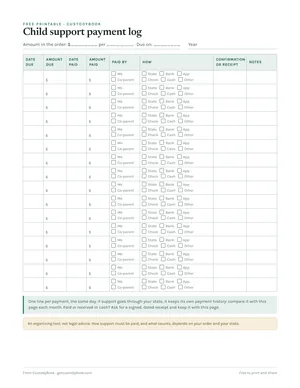
Free printable: Child support payment log
One page, US Letter, 16 lines: date due, amount due, date paid, amount paid,
who paid, how, and the confirmation or receipt. No email, no sign-up.
Free child support tracker spreadsheet
The same columns, already set up, with two made-up example rows to replace. It opens in Excel, Google Sheets or Numbers.
Download the free spreadsheet (CSV)
- Keep one row per payment, and give a partial payment its own row.
- Save screenshots of confirmations in one folder, named by date (for example, 2026-10-17-transfer.png).
- Keep child support apart from shared costs like school or doctor bills, which many orders handle separately. For those, see the co-parenting expense tracker.
Tips that keep a tracker useful
- Write the line the same day, while the details are fresh.
- Use the date the money was paid, and note it if your account shows it on a later day.
- Don't change old lines. If something was wrong, add a new line that corrects it.
- Keep the order or agreement nearby, so the amount and the due date match what it says.
Doing this in CustodyBook
- Log a Support payment: child support paid or received, and how. Choose who paid, enter the amount, and add the method if you like: state disbursement unit, bank transfer, payment app, cash, check or other. It's a personal record of facts, not advice about your case.
- Reports show child support payments: what you paid and what your co-parent paid.
- Keep it next to the rest of your record: custody days, exchanges, expenses with receipts, and notes.
- It's a private log for one parent: the other parent doesn't install anything, and never sees it unless you share it. Pay once. No monthly fee.
CustodyBook does not calculate child support and doesn't connect to your state's account: you type each payment.
CustodyBook makes court-ready PDFs: organized and dated, with edit history and a fingerprint you can verify. Edited later? The PDF says so: "Edited 1×", "Added later", and a change history. A fingerprint on every page. Check any CustodyBook PDF at getcustodybook.com/verify. Nothing is uploaded. The judge decides what is admitted. Not legal advice.


Free for 7 days, then $14.99 once. No subscription. iPhone or Android.