
Co-parenting expense tracker: free spreadsheet, template or app?
Updated November 10, 2026 · 3-minute read
Short answer: for each shared expense, write the date, what it was for, the amount and who paid. Add the split you agreed on, the other parent's share, the date you asked and the date it was paid back, and keep the receipt. A spreadsheet, a printable log or an app can all hold that.
When two homes share the costs of raising children, a simple tracker saves a lot of back-and-forth. There are three common ways to keep one: a spreadsheet, a printable template or an app. Each can work. Here is what a good tracker records and how the three compare, plus a free printable log you can use today.
What a good tracker records
- The date and what the expense was for
- The amount, and who paid
- The split you agreed on, and the other parent's share
- The date you asked for their share
- The date it was paid back, if it was
- The receipt
With those six things, you can answer the questions that come up most: what was spent, who paid, and what's still owed.
| Date | What for | Amount | Paid by | Their share | Asked | Paid back | Receipt |
|---|---|---|---|---|---|---|---|
| Oct 3 | Dentist checkup | $85.00 | Me | $42.50 | Oct 4 | Oct 10 | Yes |
Option 1 · A spreadsheet
- Good: free, flexible, easy to add up.
- Harder: receipts live somewhere else, formulas break, and it's easy to forget to update on a phone.
If you use one, keep one row per expense, a column for each of the six things above, and a folder for receipt photos with matching file names.
Free spreadsheet template: a shared expenses list with the columns already set up (date, what for, child, amount, who paid, their share, receipt kept, date asked, date paid back, notes) and two made-up example rows. It opens in Excel, Google Sheets or Numbers.
Download the free spreadsheet (CSV)
Option 2 · A printable template
- Good: simple, no setup, easy to keep with paper receipts.
- Harder: you do the math by hand, and paper can get lost.
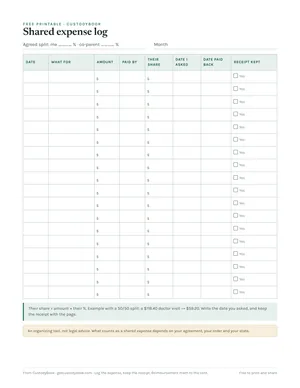
Free printable: Shared expense log
One page, US Letter. No email, no sign-up.
Option 3 · An app
- Good: the receipt photo, the math and the dates stay together in one place, and you can share a clean report.
- Harder: it usually costs money, and if the record is kept on your phone, you need to back it up.
- Check first: whether it needs both parents to sign up, and whether it charges once or every month.
Which one fits you?
If you like working on a computer, a spreadsheet is fine. If you prefer paper and keep receipts in a folder, the printable log works. If you want everything on your phone with the math done for you, an app makes it easier to keep up. Whatever you choose, the habit matters more than the tool: log each expense the same day and note the date you asked.
Doing this in CustodyBook
- Log the expense, keep the receipt.
- Turn on "I asked my co-parent to pay their share" and the app keeps the date you asked.
- Reimbursement math to the cent, with the split you set.
- Mark an expense "Already reimbursed" when it's settled.
- Export a clean monthly PDF you can share with your lawyer.
- It's a private log for one parent: the other parent doesn't install anything, and never sees it unless you share it. Pay once. No monthly fee.
CustodyBook does not calculate child support. It adds up the shared expenses you log.
Child support payments are a separate record. In CustodyBook, choose who paid, enter the amount, and add the method if you like: state disbursement unit, bank transfer, payment app, cash, check or other. A personal record of facts, not advice about your case. More in the child support payment tracker guide.
CustodyBook makes court-ready PDFs: organized and dated, with edit history and a fingerprint you can verify. Edited later? The PDF says so: "Edited 1×", "Added later", and a change history. A fingerprint on every page. Check any CustodyBook PDF at getcustodybook.com/verify. Nothing is uploaded. The judge decides what is admitted. Not legal advice.


Free for 7 days, then $14.99 once. No subscription. iPhone or Android.