
Custody documentation: what to write down (and how to keep it simple)
Updated October 31, 2026 · 6-minute read
Lawyers often ask parents for dates, times and a pattern. Not how it felt: what happened, and when. A simple record you keep as you go is easier to share than a story rebuilt months later from memory. Here is what good custody documentation usually includes, what family lawyers recommend, and how to keep a custody log (or custody journal) short.
The 6 things parents usually write down
- Custody days. Who the children were with each day. One line a day is enough.
- Exchanges. Each pickup and drop-off: date, planned time, actual time, place, and whether it was on time, late, didn't happen or was cancelled with notice.
- Shared expenses. What it was for, how much, who paid, the receipt, and the date you asked the other parent for their share.
- Child support payments. The date, the amount, and how it was paid or received. Keep the bank or payment record.
- Messages and calls that matter. A schedule change, a request, a missed reply. Save the original messages, and write one line for calls.
- Events and other facts. School meetings, doctor visits and activities, and who attended. Anything else worth remembering, written down the same day.
What family lawyers recommend
Advice from family law firms repeats the same few habits. For example, the family law firm McKinley Irvin, in its guide Keeping a Custody Journal: What to Record (and What Not To) (June 2026), suggests:
- Same day. Write entries the same day when you can, instead of rebuilding events later.
- Facts, not feelings. A neutral tone, only what you saw yourself, and no guesses about the other parent's motives.
- The times of each exchange. Pickup and drop-off times, the place, and whether the exchange happened as scheduled.
- Patterns. Look back over your entries from time to time to see what repeats.
- The records next to the notes. Keep the texts, emails and school records that go with your entries organized with the journal.
Minella Law Group, a California family law firm, makes similar points in its guide on documenting custody issues (February 2026): keep the tone neutral and factual, log the date and time of each incident, and look for a pattern instead of a single late pickup.
Some court forms ask for the same kind of detail. In Minnesota, the affidavit that goes with a motion for parenting time help (forms PAR102 and PAR103) asks for the dates and times of scheduled parenting time that the other parent denied.
For shared expenses, keep each receipt and the date you asked to be paid back.
These are examples, not rules for your case. What matters, and how it may be used, depends on your state and your judge.
How to write an entry: facts, not feelings
Write only what happened: who, what, when and where. Leave out guesses about why, and labels for the other parent. Short, neutral notes are easier to read.
- Write it the same day, while the details are fresh.
- Use exact times and places when you have them.
- One event per entry.
- Say whether you saw it yourself or someone told you.
- If you add something later, say so: "Added on May 14 about May 12."
Custody journal example: a sample week
Here is what one ordinary week can look like in a simple log. The names and details are made up.
| Day | Entry |
|---|---|
| Mon | Custody day: with me. |
| Tue | Custody day: with me. Dentist checkup, $85.00, paid by me. Receipt saved. |
| Wed | Exchange at school, planned 3:15 PM, on time. Custody day: with co-parent. |
| Thu | Custody day: with co-parent. Parent-teacher meeting at 4:00 PM, both parents attended. Text asking to swap Saturday for Sunday next week. Replied yes. |
| Fri | Exchange at home, planned 6:00 PM, arrived 6:35 PM, no message before. Custody day: with me. |
| Sat | Custody day: with me. Asked for half of the dentist bill ($42.50) by text. |
| Sun | Custody day: with me. |
Each line takes a few seconds. At the end of the month, the same entries tell you how many days the children spent in each home, how many exchanges happened and how much is still owed.
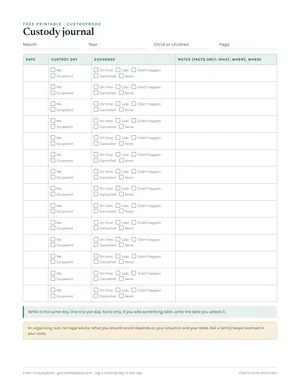
Free printable: Custody journal template
One page, US Letter: date, custody day, exchange and notes. No email, no sign-up.
Custody documents to keep together
Besides the log itself, many parents keep a few custody documents in one folder, on paper or on their phone, so they are easy to find when a lawyer asks. Common co-parenting documents:
- A copy of your parenting plan or custody order.
- Receipts for shared expenses: medical, school and activities.
- Records of child support paid or received.
- Messages about schedule changes and what was agreed.
- School and medical contacts, report cards and notes from teachers or doctors.
- Your dated custody log or journal.
Which custodial documentation matters for you depends on your situation and your state. Ask your lawyer.
Before a hearing
If a hearing or a meeting with your lawyer is coming up, a short review of your own record helps more than a long story:
- Pick the period that matters, for example since your last hearing.
- Count what is in the record: days with each parent, exchanges and how they went, expenses and what is still owed.
- Fill gaps you can confirm, and leave the rest as gaps.
- Write down the date, time and place of the hearing, and what your lawyer asked you to bring.
Your lawyer decides what to use. This is general information, not legal advice.
How often to update it
- Every day: one line for who the children were with.
- At every exchange: the time it happened and anything unusual.
- When you pay: the amount and the receipt, before you lose it.
- Once a month: fill any gaps, count the totals and save a copy somewhere safe.
If you miss a few days, don't guess. Leave the gap, or add the entry later and note when you added it.
Paper, spreadsheet or app?
Any of them can work if you keep it up. Whatever you use, look for these:
- A date on every entry.
- A place for receipts and the date you asked to be paid back.
- A way to count: days, exchanges, money owed.
- A way to find one entry again months later.
- A clean way to share it, like a PDF.
- A backup copy kept somewhere other than your phone or your desk.
How CustodyBook does it
CustodyBook is a private custody log for one parent. The other parent doesn't install or approve anything, and never sees it unless you share it.
- Log a custody day in one tap.
- Mark exchanges as on time, late, no-show or cancelled with notice.
- Log the expense, keep the receipt.
- Export a clean monthly PDF you can share with your lawyer.
- Hearing prep: a plain summary of what you logged since a date you choose: custody days, exchanges, expenses and notes. It only counts what is in your record; it does not interpret it.
- Messages: turn a screen recording of a chat into a readable list in your log — you review who said what before saving. It is read on this phone; CustodyBook does not upload the video.
- Message templates: calm, ready-to-send messages for pickups, schedule changes, expenses, school and appointments. Fill in the details, then copy or share.
- Your entries are stored on your phone. There is no account to create. App lock: open CustodyBook with Face ID, your fingerprint or your phone passcode.
New in CustodyBook 1.12
- Event: school, medical or activities, and who attended. Incident: what happened, in facts. Support payment: child support paid or received, and how. A personal record of facts, not advice about your case.
- Categories for expenses, notes, events and incidents, and Holiday, Vacation or Make-up day tags on custody days.
- Reports show child support payments and make-up days.
- Search your entries, then make a PDF of just those.
- Hearing dates: save the date, time and place of each hearing in the app.
CustodyBook makes court-ready PDFs: organized and dated, with edit history and a fingerprint you can verify. Edited later? The PDF says so: "Edited 1×", "Added later", and a change history. A fingerprint on every page. Check any CustodyBook PDF at getcustodybook.com/verify. Nothing is uploaded. The judge decides what is admitted. Not legal advice.


Free for 7 days, then $14.99 once. No subscription. iPhone or Android.