
Custody incident log: how to write down what happened (free template)
Updated November 17, 2026 · 4-minute read
Short answer: write one entry for each incident, the same day: the date and time, the place, who was there, what happened in plain facts, whether you saw it yourself or were told, and what you did next. Put anyone's exact words in quotes, and note where you saved any messages or photos that go with it.
Most days with a co-parent are ordinary. Now and then something happens that you may want to remember clearly later: a tense moment at a pickup, a child who comes back with a scrape, a school call nobody passed on. An incident log keeps those moments in one place, written the same way every time, so you don't have to rebuild them from memory months later.
What counts as an incident
There is no set list. In a personal log, an incident is simply something out of the ordinary that you want a clear note of. A few examples:
- An argument or a tense moment at an exchange.
- A child who comes back sick, hurt or very upset.
- A school, doctor or activity matter that one parent wasn't told about.
- A change of plans without notice.
- Something a child said that you want to remember word for word.
Routine pickups and drop-offs fit better in a custody exchange log, and day-to-day notes in a custody journal.
The 6 fields to write down
- Date and time. When it happened. If you write it down later, note that too.
- Place. Home, school, a parking lot, on the phone.
- Who was there. Adults and children, by name or role.
- What happened. Facts only, in order. Exact words go in quotes.
- How you know. You saw or heard it yourself, or someone told you. If you were told, write who told you.
- What you did next. A text to the co-parent, a call to the school, a doctor visit, or nothing.
Two sample entries
| Date and time | Place | Who was there | What happened | How I know | What I did next |
|---|---|---|---|---|---|
| Fri 10/9, 6:10 PM | Pickup at home | Me, co-parent, Emma (8) | Co-parent raised their voice about the weekend plan in front of Emma. Said "We'll talk about this later." Exchange done at 6:15 PM. | Saw it | Texted at 8 PM to set a time to talk about the plan. |
| Mon 10/12, 3:30 PM | Phone call | Teacher | Teacher said Emma didn't have her reading folder on Thursday and Friday. | Was told by the teacher | Emailed the teacher. Added the folder to the handoff list. |
Keep it factual and calm
An incident log is easiest to use when anyone could read it and see what happened, without your feelings about it.
- Write it the same day, while the details are fresh.
- Don't guess reasons or labels. Write what was said and done.
- Avoid rewriting old entries. If something was wrong, add a new note that corrects it.
- Don't question the children to fill the log. If they tell you something, write their words as they said them.
- Keep what goes with it: the text, the photo, the school email. Note where you saved it.
If anyone is in danger, call 911 first. The log can wait. What to do after an incident, and whether it matters for your case, is a question for your lawyer or mediator.
Free printable custody incident log (PDF)
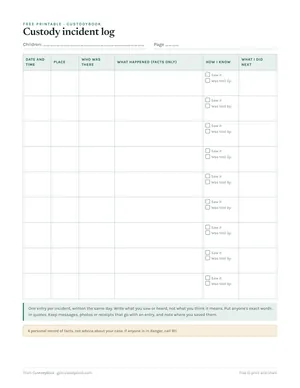
Free printable: Custody incident log
One page, US Letter, 9 entries: date and time, place, who was there,
what happened, how you know, and what you did next. No email, no sign-up.
Doing this in CustodyBook
- Log an Incident: what happened, in facts. Answer "How do you know?" with "I saw this myself" or "I was told", and write what happened in the notes. It's a personal record of facts, not advice about your case.
- Keep it next to the rest of your record: custody days, exchanges, expenses with receipts, and notes.
- Search your entries, then make a PDF of just those.
- CustodyBook is a private custody log for one parent: the other parent doesn't install or approve anything, and never sees it unless you share it.
CustodyBook makes court-ready PDFs: organized and dated, with edit history and a fingerprint you can verify. Edited later? The PDF says so: "Edited 1×", "Added later", and a change history. A fingerprint on every page. Check any CustodyBook PDF at getcustodybook.com/verify. Nothing is uploaded. The judge decides what is admitted. Not legal advice.


Free for 7 days, then $14.99 once. No subscription. iPhone or Android.